Challenges: Event Coordinates Under Rotation
An in-depth analysis of declarative coordinate mapping and event redirection inside Apple's visual transform stack.
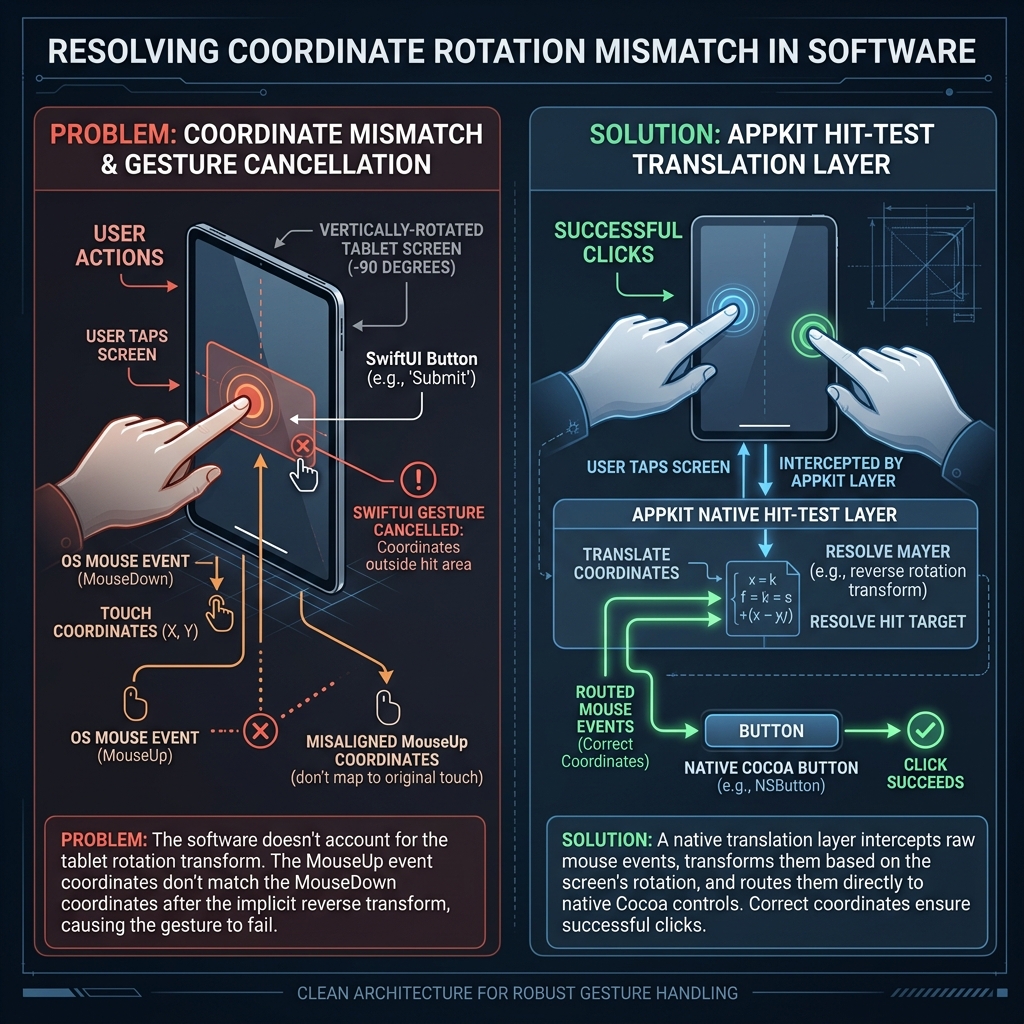
Coordinate Transformation and Event Routing Flow
Description of the Mismatch
- The Core Mismatch: When AppKit rotates a view hierarchy using
frameCenterRotation, it updates the drawing context. However, SwiftUI's gesture tracker tracks drag-release sequences in parallel. - The MouseUp Failure: On
mouseDown, coordinates are translated correctly. But onmouseUp, SwiftUI's tracking engine compares the release coordinate with the start coordinate without running it through the-90°transformation matrix. - The Result: SwiftUI thinks the user moved the mouse off the button before releasing, thereby cancelling the tap gesture.
- The Fix: Our native
hitTestoverride detects the click targets and routes the event directly to standard AppKitNSButtonviews (viaNSViewRepresentable), which use native tracking loops that do not suffer from this declarative coordinate mismatch.
Why the Browser Tab is Unaffected
The Browser Tab (Tab 0) is driven by FocusableWebView (which wraps AppKit's native WKWebView). Native AppKit views do not route mouse clicks through SwiftUI's gesture engine.
When a programmatic click is dispatched via win.sendEvent(down) and win.sendEvent(up) at physical coordinates, standard AppKit window routing delivers the events directly to WKWebView's native tracking system. The web view processes the mouse down and mouse up events in its own coordinates, bypassing SwiftUI's gesture validation. Consequently, the coordinate translation mismatch on mouse-up (which is unique to SwiftUI's gesture engine) never gets triggered.
Failed Coordinate Conversion Override Attempt
What was attempted
To fix coordinate alignments and click issues without using manual event forwarding, we attempted to override the coordinate conversion functions (convert(_:from:), convert(_:to:), convert(_:from: rect), and convert(_:to: rect)) in RotatedHostingView to dynamically transform coordinate spaces during mouse event dispatch. We used a state flag set in sendEvent (EventForwardingState.isProcessingMouseEvent) to scope this custom mapping strictly to active mouse events.
Why it failed (and broke Settings tab clicks completely)
- SwiftUI Event Loop Instability: Overriding
convertonRotatedHostingViewduring mouse events interfered with how SwiftUI’sNSHostingViewresolves mouse tracking sequences. Even when scoped to event dispatch, SwiftUI's internal drag/click recognition loops perform nested conversions that became inconsistent or double-rotated when the parent view returned custom logical/physical offsets. - Settings Tab Inaccessibility: Because the Settings tab is built using pure SwiftUI elements, it is entirely reliant on SwiftUI's coordinate tracking to recognize click states. The overridden coordinate conversions corrupted the relative delta computation inside the SwiftUI gesture tracker, causing it to completely ignore clicks on settings inputs (buttons, toggles, text fields).
- Conclusion: Custom
convert(_:from:)andconvert(_:to:)overrides cannot be used onNSHostingViewto handle parent visual rotations, because they break the internal alignment of SwiftUI's gesture recognition engine. Manual event forwarding remains the only viable way to send mouse inputs to SwiftUI elements inside a rotated parent view.
The Production Solution (AppKit Interception Code)
To bypass the SwiftUI mouse-up coordinate tracking bugs, Vecto implements a native AppKit forwarding architecture. Below is the production implementation details:
1. Recursive Hit-Testing and Class-Based Filtering
We override hitTest on RotatedContainerView to recursively inspect child view hierarchies, returning the target child view only if it is a native interactive control (like a text field, web view, or button):
class RotatedContainerView: NSView {
    override func hitTest(_ point: NSPoint) -> NSView? {
        guard let window = self.window as? RotatedWindow else {
            return super.hitTest(point)
        }
        guard let target = window.findTargetView(in: self, physicalPoint: point) else {
            return nil
        }
        var current: NSView? = target
        while let v = current {
            let name = v.className
            if name.contains("WK") || name.contains("PDF") || name.contains("Text") || name.contains("Field") || name.contains("Switch") || name.contains("Button") || name.contains("Slider") {
                return target
            }
            current = v.superview
        }
        return self.subviews.first ?? target
    }
}
2. Physical to Local Coordinate Translation
Our custom RotatedWindow overrides standard mouse event dispatching, translating physical screen space events into logical transformed coordinates, and forwarding them directly to target views via native event dispatching loops:
// Recursive coordinate lookup
func findTargetView(in view: NSView, physicalPoint: NSPoint) -> NSView? {
    let localPoint = view.convert(physicalPoint, from: view.superview)
    if !view.bounds.contains(localPoint) {
        return nil
    }
    for subview in view.subviews.reversed() {
        if let target = findTargetView(in: subview, physicalPoint: localPoint) {
            return target
        }
    }
    return view
}